@Mentions in Atlas.md Mobile
The @Mentions feature in Atlas.md Mobile gives you a quick, organized way to see when teammates tag you in notes, tasks, or updates, right from your phone.
To view recent mentions:
- Open Atlas.md Mobile.
- Scroll to the Recent Mentions panel on the home screen
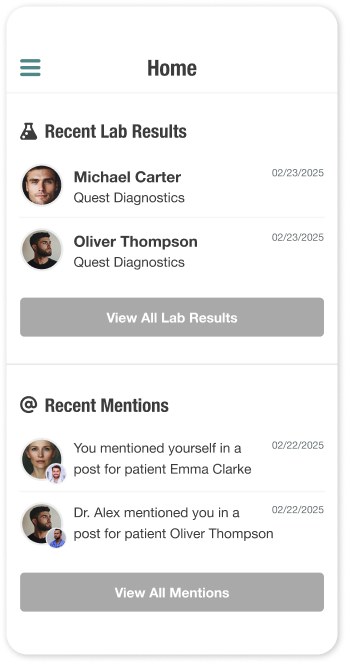
- Tap any mention to view its details and surrounding context
To see all unread or past mentions:
- From the home screen, tap View All Mentions
- Switch between Unread and Read tabs as needed
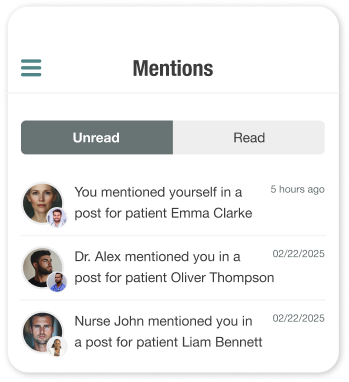
- Tap a mention to open the full detail view
When viewing a mention:
- You’ll see who mentioned you, which patient it relates to, and the full mention message
- Tap Show More to expand longer notes
- Tap Mark as Read once you’ve reviewed it
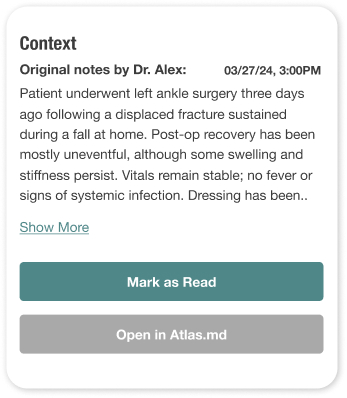
- Tap Open in Atlas.md to jump into the patient chart in the web EMR
Mentions you read on mobile will automatically be marked as read in your web account, keeping everything in sync.
Still stuck? Shoot us an email and we'll do our best to help. Contact